Windows 8 Build 8008.0.fbl_dnt2_bus.110518-1800
跳转到导航
跳转到搜索
| Windows 8 的版本 | |
-Desktop.png) | |
| 操作系统系列 | Windows NT 系列 |
|---|---|
| NT 版本 | Windows NT 6.2 |
| 内部版本号 | 8008 |
| 修订版本号 | 0 |
| 体系结构 | x64 |
| 内部版本实验室 | fbl_dnt2_bus |
| 编译日期 | 2011 年 5 月 18 日 |
| 有效期 | |
| 时间炸弹 | 2012 年 3 月 15 日 (+302 天) |
| 关于对话框 | |
-About.png) | |
Windows 8 Build 8008.fbl_dnt2_bus 是 Windows 8 的 Developer Preview/Milestone 3 前版本,于 2024 年 10 月 31 日共享。
这是首个包含 Developer Preview 品牌相关内容的版本,尽管只有在从操作系统本身运行安装程序时才能看到这些内容。
SKU 版本和密钥
| 版本 / SKU 名称 | 密钥 |
|---|---|
| Home Basic | YGFVB-QTFXQ-3H233-PTWTJ-YRYRV |
| Home Premium | RHPQ2-RMFJH-74XYM-BH4JX-XM76F |
| Professional | HYF8J-CVRMY-CM74G-RPHKF-PW487 |
| Ultimate | D4F6K-QK3RD-TMVMJ-BBMRX-3MBMV |
| Developer Preview (Prerelease) | VKKC6-NQQQH-JW3QX-XRVKX-KJJK9 |
新增功能和更改
安装程序
- 第二阶段现在与启动屏幕相同。
- 对现代安装客户端(
installprep.exe)有两个更改:- 启动画面中去掉了“8”,只剩下“Windows”。
- “Windows 8”的引用更改为“Windows Developer Preview”。
其他
- 移除了任务栏的用户头像。
- 移除了控制面板中的“更改外观”选项。
- 移除了 Flip 3D。
- 在此版本中,Wordoku 拼图桌面壁纸再次进行了调整。背景颜色现在为深蓝到浅蓝,波纹看起来比以前更小,也不那么光亮。
- 在功能区菜单的帮助按钮旁边添加了带箭头图标的最小化功能区按钮。
- Windows Defender 界面从 Microsoft Security Essentials 更新。
- “
Windows is loading files(Windows 正在加载文件)”文本更改为“Loading files(正在加载文件)”,并左对齐,这一改动从内核开发分支的版本中逆向集成,同时在仅从内核开发分支 Build 7990 开始引入的“Welcome”(欢迎)文本上方添加。 - 添加了用于安装和移除 AppX 应用包的
add-appxpackage和remove-appxpackagePowerShell 命令,以替代InstallAppX.exe(此程序在 Build 7992 中重命名为InstallAppX.Deprecated.exe)。
Redpill
自 8002 以来发生了重大变化。
- Charm 栏现在是黑色的,并且在左侧引入了一个额外的较小 Charms 菜单,而默认情况下,右侧的 Charm 栏仅在存在触摸屏时可访问。移除了 Switch charm(切换 Charm),应用之间的切换现在通过从屏幕左侧拖动来完成。
- 更新了 Metro 界面动画,语言小程序现在可以正常使用。
- 移除了 Metro 登录屏幕上的鱼形图案。
- OOBE 颜色滑块现在可见,但在选择颜色时它会再次消失。此外,辅助功能图标也获得了最终外观。
- 更改了文件资源管理器功能区中占位符图标的外观。这些图标不再是橙色圆圈,而是深绿色,类似于 1982 年 Microsoft 标志中间的 O。
- “用户账户”控制面板小程序中创建登录模式的链接不再可用。
- 显示桌面按钮的外观略有更新(系统版本本身已 Redpill)。
打开文件并选择默认程序对话框
在之前版本中的“选择默认程序”对话框之后,“打开文件”对话框也已重新设计为使用新的 Metro 风格。其结构现在与上述对话框大致相同,只是额外提供了在 MS Help 商店中查找应用的选项,但是这不会产生任何操作,原因是 MS Help 应用无法通过这种方式打开。不过,旧的用户界面仍然保留,且在 Redpill 禁用时仍然可以访问。
“选择默认程序”对话框现在可以正确显示相关文件扩展名,而不是在此位置显示乱码,从而解决了上一版本的问题。
Charm 栏辅助功能
- 要在非触摸屏设备上启用右侧的快捷栏,请打开注册表编辑器,然后导航到
HKEY_CURRENT_USER\Software\Microsoft\Windows\CurrentVersion\ImmersiveShell。到达此位置后,创建一个名为CharmBarMode的 DWORD 值,然后将其值设置为 1。
登录屏幕
- 此版本在屏幕中下方添加了“Microsoft Confidential”,类似于 Windows 7 中的实现,但它只出现在 Metro 登录屏幕上。在后来的 Build 8032 中,它会被改为“Windows Developer Preview”,并添加到传统登录屏幕上。
- 锁屏现在总是显示,无需按 Ctrl+Alt+Del 登录或开启触控访问。
Bug
在 VMware 中安装
与 Release Preview 之前的版本类似,如果此版本在 VMware Workstation 15 或更高版本上运行,将会发生早期启动错误。若要解决此问题,请将硬件兼容性更改为 8.x 或 9.x 版本。
升级
在升级的准备阶段之后,Windows 可能会遇到由 winhv.sys 引起的 SYSTEM_THREAD_EXCEPTION_NOT_HANDLED 的错误检查。若要绕过此问题,请进入安全模式,然后删除或重命名位于 C:\Windows\System32\Drivers 的此文件。
其他
- 在安装的第二部分,启动转轮动画可能会在一瞬间重复显示占位符。
- 有时,在操作系统完全关机后,系统可能会自行出错并拒绝启动,表现为在启动界面完全关机或启动循环。
图库
-
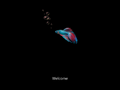
启动屏幕
-
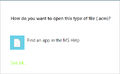
新设计的打开文件对话框


