Windows 8 Build 7887.0.fbl_grfx_dev1.101118-1700
| Windows 8 的版本 | |
 | |
| 操作系统系列 | Windows NT 系列 |
|---|---|
| NT 版本 | Windows NT 6.2 |
| 内部版本号 | 7887 |
| 修订版本号 | 0 |
| 体系结构 | x86、x64 |
| 内部版本实验室 | fbl_grfx_dev1 |
| 编译日期 | 2010 年 11 月 18 日 |
| 有效期 | |
| 时间炸弹 | 2011 年 7 月 1 日 (+225 天) |
| 关于对话框 | |
 | |
Windows 8 Build 7887 是 Windows 8 的版本,于 2024 年 10 月 20 日共享,在公开共享之前,其 MINIDDK 在 2022 年 NVIDIA 数据泄露中被引用,位于文件 integ\gpu_drv\stage_rel\drivers\stereo_vision\Apps\Win8StereoSamples\BltTest\BltTest 中。
SKU 版本和密钥
| 版本 / SKU 名称 | 密钥 |
|---|---|
| Starter | 7Q28W-FT9PC-CMMYT-WHMY2-89M6G |
| Home Basic | YGFVB-QTFXQ-3H233-PTWTJ-YRYRV |
| Home Premium | RHPQ2-RMFJH-74XYM-BH4JX-XM76F |
| Professional | HYF8J-CVRMY-CM74G-RPHKF-PW487 |
| Ultimate | D4F6K-QK3RD-TMVMJ-BBMRX-3MBMV |
新增功能和更改
移除“开始”按钮
从此版本开始,可以从任务栏上移除“开始”按钮。要实现这一点,需要在 HKEY_CURRENT_USER\Software\Microsoft\Windows\CurrentVersion\Explorer 下创建一个名为 YouBettaHideYoPearl 的新 DWORD 值,并将其值设置为 1。完成后,注销并重新登录。如果操作正确,“开始”按钮应被移除。
系统崩溃
在此版本中,重新设计了蓝屏死机,不再使用 Windows XP 中的设计,而是采用简化的黑屏,用于通知用户计算机需要重启,并显示错误代码(不包括参数)。此错误检查屏幕使用 Segoe UI 字体,利用了早期版本中实现的 VBE 功能和 BGFX 子系统。不过,如果系统在 BGFX 初始化之前的启动阶段崩溃,将使用备用方案,仅显示错误代码参数以及一条简短信息,提示用户按住电源按钮。
启动环境
启动环境现在在 UEFI 系统上使用 UEFI GOP,使启动菜单和启动画面能够以显示器的原生分辨率显示。然而,在开发的这个阶段,基础显示驱动程序还无法使用 UEFI GOP。
Redpill
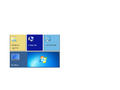
自从 Build 7880 以来,发生了许多变化。已经实现了语言重音和背景,可以通过注册表键访问。“开始”屏幕现在有多种视图——虽然在 7880 中通过右键单击“开始”屏幕磁贴时出现的“移动到其他视图”选项暗示了这一点,但它尚未完全实现。这个其他视图是一个“其他程序”视图,包含所有已安装的程序。因此,默认“开始”屏幕视图中的应用数量减少了。此版本还包含一些独特的 Metro 动画。磁贴颜色已更改为更统一的样式。
为了替代 Metro 下拉区域(在 Build 7878 中被移除,虽然不完全如此),引入了一个桌面磁贴。单击它会将用户带回经典 Windows 桌面。
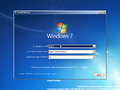
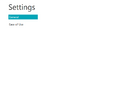
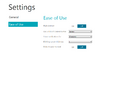
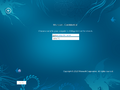
“开始”屏幕之外也发生了大量变化。引入了 ImmersiveSettings 应用,这是 PC 设置的前身,并且几个应用已被重新设计以完全使用 WinRT。Aero 主题下不再默认启用自动着色。全新安装体验也进行了重大改造。更新了 Modern 任务管理器,以更接近其 RTM 版本。Metro 下拉区域被放弃,取而代之的是窗口捕捉功能。
“开始”屏幕的强调色
若要获得“开始”屏幕的强调色,请打开注册表编辑器,导航到 HKEY_LOCAL_MACHINE\SOFTWARE\Microsoft\Windows\,创建一个名为 DWM 的新键,创建一个名为 EnableAccent 的 DWORD 值,并将其值设置为 1。之后,注销然后重新登录,或重启 explorer.exe。
由于此版本对强调色的实现尚不完整,屏幕上可能会出现视觉异常。
登录
更新了登录屏幕,以展示与启动屏幕相同的音效和背景。
同样,还实现了锁屏功能,无论计算机是否设置为需要按 Ctrl+Alt+Del 登录,此锁屏都会出现。或者,如果用户在用户帐户控制面板页面启用了触摸访问功能,也可以在不按上述热键的情况下启用锁屏。
此版本还支持图案登录,但首先需要在 HKEY_LOCAL_MACHINE\SOFTWARE\Microsoft\Windows\CurrentVersion 中将 EnablePatternLogonForInternalTesting 的值设置为 1 后才能启用。之后,用户可以在用户帐户控制面板页面设置图案。
-
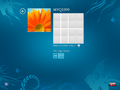
图案登录

可移动媒体提示
可移动媒体提示也进行了改版,采用了新的 Metro 设计。它主要包含与早期 Windows 7 版本中使用的可移动媒体提示相同的操作。
沉浸式应用
- 沉浸式阅读器:
C:\Windows\System32\glcnd.exe - Metro 控制面板:
C:\Windows\System32\SystemSettings.exe - 摄像头应用:
C:\Windows\System32\webcam.exe
Bug
一般
- 登录时登录声音会播放三次。
- 在 VMware Workstation 15 或更高版本中运行此版本时,关机或重启会导致软锁定。可以通过使用主机的电源菜单来解决此问题。
安装程序
- 在启动安装程序并且计算机重新启动进入 OOBE 之前显示的状态消息的最后一个单词被截断。
外壳
- 登录后,“开始”屏幕可能会在一分钟内无响应。
- 首次登录后,桌面磁贴将显示 Windows 7 的默认壁纸。
主题
- 标题栏和水印使用的是 Arial 字体,这是由于
aero.msstyles和aerolite.msstyles文件中的拼写错误造成的。 - 使用 Windows Aero 主题时,只有窗口框架的顶部会被模糊,侧边框仍保持透明。
- 由于强制使用 DWM Aero 主题,Windows 基本和高对比度主题无法正常渲染。
图库
-
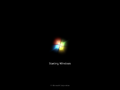
启动屏幕
-
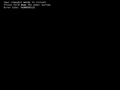
早期启动错误
-
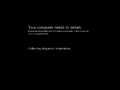
系统崩溃
-
安装程序


Redpill
-
“开始”屏幕
-
ImmersiveSettings
-
同上一个
-
全新安装体验
-
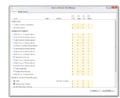
Modern Windows 任务管理器


