Windows 8 Build 7746.0.fbl_grfx.100428-2024
| Windows 8 的版本 | |
 | |
| 操作系统系列 | Windows NT 系列 |
|---|---|
| NT 版本 | Windows NT 6.1 |
| 内部版本号 | 7746 |
| 修订版本号 | 0 |
| 体系结构 | x64 |
| 内部版本实验室 | fbl_grfx |
| 编译日期 | 2010 年 4 月 28 日 |
| 有效期 | |
| 时间炸弹 | 2010 年 10 月 1 日 (+156 天) |
| 已知 SKU 版本 | |
| Home Basic、 Home Premium、 Professional、 Ultimate 默认不可用:[a] Starter、 Enterprise | |
| 关于对话框 | |
 | |
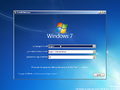
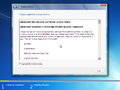
Windows 8 Build 7746 是 Windows 8 最早可用的 Milestone 1 版本,此版本大约于 2010 年 5 月发布给图形设备制造商,并随后于 2020 年 5 月 3 日共享了 x64 体系结构版本,同时附有其他几个版本的截图。
由于它的早期性,系统范围内许多地方仍然将自身标识为“Windows 7”,内核版本仍然是 6.1。
新增功能和更改
网络启动调试
此版本是目前首个支持通过网络进行启动调试的版本,包含了用于 Realtek RTL8139 和 Intel PRO/1000 网卡的驱动程序。然而,由于网络内核/启动调试的实现还处于早期开发阶段,它并未实现 KDNET 最终版本中使用的加密密钥系统,因此默认的 WinDbg 网络调试设置(假设密钥已存在)将无法连接到此版本的调试器。
用户界面
为了针对后续的 Windows 8 开发做准备,在程序的兼容性选项卡中新增了一个“Windows 7”兼容模式选项,默认选项现在设置为“Windows 8”,禁用了某些仅适用于 Windows 7 的应用的安装(除非使用上述兼容性设置)。此外,默认壁纸更改为 Harmony,这一变化最早在 Build 7731 中被发现。
“Send feedback(发送反馈)”快捷方式现在再次出现在桌面上,其功能与 Windows 7 Build 7055 相比类似。然而,与上述版本相比,此版本的小程序有一些变化,例如删除了“Send feedback(发送反馈)”按钮、“输入产品密钥(Enter your product key)”和“Learn about Microsoft Beta Programs(了解 Microsoft Beta 版本计划)”的链接,并用一个通过 Microsoft 域凭据登录 Product Studio 的单一选项取而代之。
-
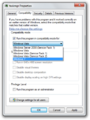
Windows 7 兼容模式
-
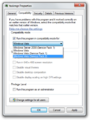
同上一个,在 Build 7700 中缺失
-
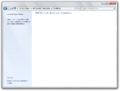
反馈工具
-

同上一个,与 Build 7055 相比
-
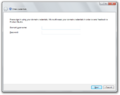
Product Studio 登录


桌面窗口管理器
几个图标,比如 Internet Explorer 和 Windows Media Player 图标,现在在任务栏上的显示有所不同——Internet Explorer 图标在“e”字母的间隙周围有一个更深的黄色圆环和更精致的质感,而 Windows Media Player 图标整体看起来更加光亮。
Internet Explorer
与 Build 7700 相比,这个版本中包含的 Internet Explorer 9 版本有了显著改进,现在在 IE9 模式下浏览 HTML5 内容时大部分可以正常显示,同时在查看非 HTML5 内容时也能正常显示。页面上的按钮和其他可交互内容现在也可以点击,与之前不同,浏览器在尝试加载 HTML5 页面时也不会再崩溃。
-
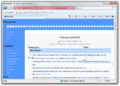
功能性 HTML5 页面
-
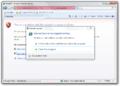
同上一个,Build 7700 中的非功能性 HTML5 页面
-
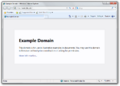
正确呈现的非 HTML5 内容
-
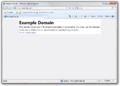
同上一个,在 Build 7700 中显示不正确


其他
此版本与 Build 7700 相比,增加了 Windows 7 RTM 内核导出功能:
在此版本中添加或移除的内核导出完整列表:
新增的导出:
__C_specific_handler_misaligned_access_local_unwind_setjmp_setjmpexExpInterLockedPopEntrySListEnd16ExpInterLockedPopEntrySListFault16ExpInterLockedPopEntrySListResume16LdrGetDllPathNtAlpcConnectPortExRtlAddFunctionTableRtlClearBitRtlCompleteProcessCloningRtlCopyContextRtlCopyMemoryRtlCopyMemoryNonTemporalRtlCreateUmsCompletionListRtlCreateUmsThreadContextRtlDeleteFunctionTableRtlDequeueUmsCompletionListItemsRtlExecuteUmsThread
移除的导出:
_alldiv_alldvrm_allmul_alloca_probe_alloca_probe_16_alloca_probe_8_allrem_allshl_allshr_aulldiv_aulldvrm_aullrem_aullshr__chkstk_Clcos_Cllog_Clpow_Clsin_Clsqrt_ftolKiFastSystemCallKiFastSystemCallRetNtCurrentTebNtWow64CallFunction64NtWow64CsrAllocateCaptureBufferNtWow64CsrAllocateMessagePointerNtWow64CsrCaptureMessageBufferNtWow64CsrCaptureMessageStringNtWow64CsrClientCallServerNtWow64CsrClientConnectToServerNtWow64CsrFreeCaptureBufferNtWow64CsrGetProcessIdNtWow64CsrIdentifyAlertableThreadNtWow64CsrVerifyRegionNtWow64DebuggerCallNtWow64GetCurrentProcessorNumberExNtWow64GetNativeSystemInformationNtWow64InterlockedPopEntrySListNtWow64QueryInformationProcess64NtWow64QueryVirtualMemory64NtWow64ReadVirtualMemory64NtWow64WriteVirtualMemory64RtlConvertUlongToLargeIntegerRtlExtendedIntegerMultiplyRtlExtendedLargeIntegerDivideRtlExtendedMagicDivideRtlFillMemoryUlongRtlFillMemoryUlonglongRtlInitializeExceptionChainRtlLargeIntegerAddRtlLargeIntegerArithmeticShiftRtlLargeIntegerDivideRtlLargeIntegerNegateRtlLargeIntegerShiftLeftRtlLargeIntegerShiftRightRtlLargeIntegerSubtractRtlpQueryProcessDebugInformationRemoteUshortByteSwapZwWow64CallFunction64ZwWow64CsrAllocateCaptureBufferZwWow64CsrAllocateMessagePointerZwWow64CsrCaptureMessageBufferZwWow64CsrCaptureMessageStringZwWow64CsrClientCallServerZwWow64CsrClientConnectToServerZwWow64CsrFreeCaptureBufferZwWow64CsrGetProcessIdZwWow64CsrIdentifyAlertableThreadZwWow64CsrVerifyRegionZwWow64DebuggerCallZwWow64GetCurrentProcessorNumberExZwWow64GetNativeSystemInformationZwWow64InterlockedPopEntrySListZwWow64QueryInformationProcess64ZwWow64QueryVirtualMemory64ZwWow64ReadVirtualMemory64ZwWow64WriteVirtualMemory64
Bug
安装
要在 VMware Workstation 中安装或运行此版本,硬件兼容性版本必须设置为 8.x/9.x,否则在尝试加载操作系统时会发生 PHASE0_EXCEPTION 错误检查。
其他
System Information(系统信息)应用中“System Drivers(系统驱动程序)”部分使用的大多数描述字符串(如 kbdhid、processor 和 usbtor 字符串)都是伪本地化的。
自述文件
此版本随以下自述文件一起共享:
自述文件
Microsoft Windows 8

Build 6.1.7746.fbl_grfx.100428-2024
x64 Free
MS Partner seed
28 April 2010

And images of:
An unknown 777x build (7777 probably, it's out there)
An unknown 778x build
6.1.7791
6.1.7792.winmain (all I know)
6.1.7793 (the person who gave this to me said the builds were two builds apart, so you can tell this :p)
6.1.7814.fbl_core1_kernel_ee.100907-1700
6.2.7875.fbl_grfx_dev1.101102-1700 (A very cool build, basically 7850+, it would be great if this leaked pssst)
6.2.7878.winmain.101104-1752
6.2.7880.fbl_ (all I know)
6.2.7899.fbl_core2_sfs.101209-1900

Here's a (little) present, as part of the tons of leaks that have been going on lately :D.

Some of y'all are gonna be fuckin pissed with this, but I took precautions to prevent any names coming out so don't worry! This comes from our "good friend" zammis originally.

This is the most boring build known to man (so why be pissed?). The background has reverted to the Windows 7 background, and the only non-internal change I can see is the Send Feedback tool, which was removed before 7850 anyway.

This is one of the first builds to refer to itself as Windows 8. Have fun, really - BIOS date is April 28th, 2010.

Also included are screenshots of various Windows 8 builds, mostly from "the gap" - 7850 to 7927. These have been EDITED to protect the identities of those who gave them to me, both from legal issues and retards on betaarchive pestering them "HEY GIV ME WINDOWS 8 BILD 7875 NAO" retards. They are NOT fake and I can tell you that they are not fake. I have the original images of these builds, but I am not going to give them to you until at the very least any potential leak of these builds. Furthermore, a report from a tool that I am working on that was run under 7791 for testing purposes is shown, so you can see most of what 7791 has in the Metro department.

Notes about these builds:
- They ALL come from zammis.
- 7791 is the first build with a functional start screen.
- There is an IE lockout in 77xx for the IE9 UI involving a function in iertutil.
- 7814 is identical to 7850 in terms of metro.
- 7898 is a real build, there are two compiles of it, both kernel lab.
- Redlock R74, the latest release, DOES NOT WORK on 7878 to 7898. It DOES work on 7791 to 7875. I DO have a test build of Redlock (lucas mentioned this test build in public BW discord), but I am NOT about to leak that to you. This is due to Metro being M2 reverse integration hell around this time. 7791 actually works on the original release of Redlock R71 fwiw.
- 7753 is the partner seed build that came after this.
- 7875 is scary to some people
- 7878 is the first with new autoplay, oobe, and 79xx-y metro.
- Yes late 78xx had arial as the title bar font. God knows why. See 7867 if you're not convinced.
- The new BSOD was introduced inbetween 7880 and 7898.
- I might have a few more images.

Redpill versions:
7791: 2
7793: 6
7814, 7850: 8

7927: 21

Q&A:
NO I will not tell you who gave me this build so you can spam their DMs on BA or Discord or Anywhere
NO I will not tell you who gave me the screenshots of the other builds.
NO I will not tell you who have the other builds.
NO I don't have anything else.
NO I don't know the full extent of who has what.
NO I'm not going to leak any PMs of these individuals.
and finally NO this build has no metro features or the aforementioned IE lockout. Metro wasn't a thing until 778x, and it wasn't functional until 7791 as you can see.

YES I am doing this for the sake of preservation - these can't sit on my and others' hard drive forever
YES the cool people know who they are.
YES they're all going to hate me now.
YES I am trying to get people to come forward with what they have and leak it - some people even want the late 78xx stuff to leak - late 77xx and 7875 to 7898 is the coolest range of win8 imo - I'm leading by example here, but obviously you don't HAVE to leak shit.

Thanks,
Cosmo
截至目前,随着 Windows 8 Build 7898 的 fbl_core1_kernel_ee 编译版本泄露,此自述文件中提到的每个版本现在都已公开可用。
图库
-
-
Windows 安装程序
-
许可协议


注
- ↑ 这些 SKU 的软件包存在于版本的组件存储中,但用户必须手动准备它们才能安装