Windows Longhorn Build 3718.0.Lab06_N.021119-1730
请不要与下列词条混淆:Windows Server 2003 Build 3718,这是使用相同内部版本号的不同版本。
Windows Longhorn Build 3718 是 Windows Longhorn 当前可用的最后一个 Milestone 3 版本,于 2004 年 4 月 30 日联机共享。[1]它在功能和模块上与 Build 3713 非常相似,尽管拥有更稳定的 Windows 资源管理器。
| Windows Longhorn 的版本 | |
 | |
| 操作系统系列 | Windows NT 系列 |
|---|---|
| NT 版本 | Windows NT 6.0 |
| 内部版本号 | 3718 |
| 修订版本号 | 0 |
| 体系结构 | x86 |
| 内部版本实验室 | Lab06_N |
| 编译日期 | 2002 年 11 月 19 日 |
| 有效期 | |
| 时间炸弹 | 2003 年 11 月 14 日 (+360 天) |
| 已知 SKU 版本 | |
| Professional、 Media Center Edition、 Tablet PC Edition[a] | |
| 产品密钥 | |
| CKY24-Q8QRH-X3KMR-C6BCY-T847Y | |
| 关于对话框 | |
 | |
  | |
NFO 文件
NFO 内容
        ██
       █▒█
    ███▒▓▒███              █      ██  ██ ██
     █▒▓▓▓▒█           ███ █      ██  ██ ███
      █▓▓▓█           ███  ██     ██  ██ █  ██
     █▒██▒█          ██    ██ ██  ██  ██ ██
    ███  ██          █   █ ████   ██  ██ ███   ██
       ██            ████  ███    ██████ █     ██  █
      █████  █    ██ ██    ██     ██████ ██    █ █ █   ███
    ███▒▒▒█   ██  ██ ██                    ██  █  ██   ███
     █▒▓▓▒█   ███ ██ ██             █       █  █  ██  ██ ██
     █▒▓▓▒█   ██████ ██            ███         █  ██  ██  ██
     ██▒▓▒█   ██ ███ ██           █████            █ ██   ███
      █▒▓▒█   ██  ██             █▒▒▒▒██           █ ██       ███
      █▒▓▒█   ██               ██▒▒▓▓▒▒██            ██      ██ ██
      █▒▓▒█   ██               ██▒▓▓▓▒▒▒██            ██    ██   ██
      █▒▓▒█   ██              ██▒▓▓▓▓▓▒▒▒██            ██ █████   ██
      █▒▒█                   ██▒▒▓▓▓▓▓▓▒▒▒██            █ ██  █
      █▒██                  ██▒▒▓▓▓▓▓▓▓▓▒▒▒██             ██
      ██          ███████████▒▒▓▓▓▓▓▓▓▓▓▓▒▒▒███████████    ██
                  ██▒▒▒▒▒▒▒▒▒▒▒▓▓▓▓▓▓▓▓▓▓▓▒▒▒▒▒▒▒▒▒▒███     ███
                   ███▒▒▒▓▓▓▓▓▓▓▓▓▓▓▓▓▓▓▓▓▓▓▓▓▓▓▒▒████        █
                     ███▒▒▓▓▓▓▓▓▓▓▓▓▓▓▓▓▓▓▓▓▓▓▒▒▒████
                       ██▒▒▓▓▓▓▓▓▓▓▓▓▓▓▓▓▓▓▓▓▒▒▒███
                        ███▒▓▓▓▓▓▓▓▓▓▓▓▓▓▓▓▓▒▒███
                          ██▒▓▓▓▓▓▓▒▓▓▓▓▓▓▓▒▒██
                          ██▒▓▓▓▓▒▒██▒▓▓▓▓▓██
                         ██▒▓▓▓▓▒▒███▒▒▒▓▓▓▒█
                         █▒▓▓▓▓▒▒▒█  ██▒▒▓▓▒▒█
                        █▒▓▓▓▒▒▒██    ██▒▒▓▓▒▒█
                       █▒▒▓▓▒▒██       ██▒▒▓▓▒██
                      █▒▒▒▒▒███         ███▒▒▒▒▒█
                     ██▒▒▒██              ██▒▒▒▒██
                    ██████                  ██████
			    [2004 -- Are you ready?]
         ---[> Proudly Presents For Your Viewing Pleasure <]---


             ┌╔════════════════════════════════════════════════╗┐
             │║ █                                            █ ║│
             │║  █  Windows "Codename: Longhorn" Build 3718 █  ║│
             │║  █         Released: 4/30/2004              █  ║│
             │║ █          Leaker: EmoAddict15               █ ║│
             └╚════════════════════════════════════════════════╝┘
         			CRC Value -- CADF1F2A
				Size -- 535,867,392 bytes

                    ┌──────────────────────────────────────┐
                    │               Overview               │
                    │ A "new" longhorn build for you guys  │
                    │ to play with.  Better grab the 	   │
                    │ fucking tissues.			   │
                    │ 					   │
                    │ Apparently, DCE doesn't need a dx9   │
                    │ GPU like we all thought.  The menu   │
                    │ to enable DCE effects is in Display  │
                    │ Settings and Advanced.  So go there  │
                    │ enable it, have a fucking blast kids.│
                    │ Fuck, I'm cool.			   │
                    └──────────────────────────────────────┘

                    ╔══════════════════════════════════════╗
                    ║             Directions               ║
                    ║    				   ║
 		    ║	** BE SURE YOUR DATE IS **	   ║
 		    ║	** 11/30/02 !!!!!!!!!!! **	   ║
                    ║					   ║
                    ║  1. Extract                          ║
                    ║  2. Burn the ISO ( It's bootable     ║
                    ║      AND untouched ).		   ║
                    ║  3. Run setup.exe in windows or      ║
                    ║     winnt.exe from DOS (recommend    ║
                    ║     using Smartdrv.exe if doing a DOS║
                    ║     install, unless you're booting   ║
                    ║     from the CD. 			   ║
                    ║  4. Installing using a .NET RC1 key, ║
                    ║     like this one:		   ║
                    ║     TM44C-92G7F-29924-2J8VH-RPCKB    ║
                    ║  					   ║
                    ║  >> .NET RC1 Key Database coming	   ║
                    ║     soon <<			   ║
                    ╚══════════════════════════════════════╝

                    ╔══════════════════════════════════════╗
                    ║        ..Visit iNFLUENCE..           ║
                    ║  This year, we're innocent, I promise║
                    ║   				   ║
                    ║  IRC: irc.lifeclot.net		   ║
                    ║  Channel: #Toastednet                ║
                    ║  Channel: #BetaOS			   ║
                    ║      				   ║
                    ║  Setup a BOT and share 3718!         ║
                    ╚══════════════════════════════════════╝


                    ╔══════════════════════════════════════╗
                    ║           ..Greetings..              ║
                    ║  NightDarker  -- My Nigga		   ║
                    ║  `Night   -- Best M$ Whistler Cracks ║
                    ║  meelWORM -- #eXPerience ;)	   ║
                    ║  ^^Matt^^ -- I wouldn't be here.     ║
                    ║  Bullz    -- iNFL wouldn't exist...  ║
                    ║  Citra    -- Best M$ Cracker	   ║
                    ║  Reflectiax -- Sorry I leaked this,  ║
                    ║                but you quit the scene║
                    ║                :(	 		   ║
                    ║  Cpu Killer			   ║
                    ║  Mandy Cat -- :-*			   ║
                    ║  Katy -- You're famous now, kid.	   ║
                    ║					   ║
                    ╚══════════════════════════════════════╝


DeC -- Fuck you, asshole.  You're the whole reason this got leaked. That and my stupidity.
BOFH -- Fuck you too.  You're a fucking retard and disgrace to the scene.
新增功能和更改
边栏
边栏现在默认是透明的,但是,禁用透明度的选项已被删除。
Media Center
Media Center 现在在“添加或删除程序”小程序中称为“Media Center”,取代了以前提及的“Freestyle”。
Bug
一般
- “Low Risk”和“High Risk”文本在 Windows Trust Manager(Windows 信任管理器)中重叠。
- 无法右键单击新任务栏。
- DiskPart 不工作,并且会提示用户
This version of diskpart is not supported on this platform.(此平台不支持此版本的 diskpart)。 - 调整分辨率时,边栏将无法正常渲染。
Media Center
无法安装 Windows Media Center,原因是在安装介质上不存在所需的组件。
控制面板
- 由于添加了 WinFS 任务窗格,用户无法查看系统驱动器或文件夹(如
System32)。除此之外,将控制面板切换到经典视图的选项不再可用,这使得大多数控制面板小程序完全无法访问。- 删除
HKEY_LOCAL_MACHINE\SOFTWARE\Microsoft\Windows\CurrentVersion\Explorer中的WebView键值会将任务窗格还原为其 Windows XP 对应项,从而允许用户将控制面板切换到经典视图。
- 删除
- 显示属性将 Luna 主题称为 Plex 主题。
MyTVApp
由于 AvalonBrowserInteropProxy.exe 崩溃,无法再打开 MyTVApp。
桌面组合引擎
桌面组合引擎仅在硬件层上呈现用户界面,而软件层则呈现为黑屏或剩余数据。因此,尝试使用软件捕获方法(如 Print Screen)将无法正确捕获屏幕。大多数虚拟机管理程序仅呈现软件层,这通常会导致在启动 DCE 时出现黑屏。
文件差异
与 Build 3713 Professional 相比,新增或移除了以下文件:
| 名称 | 描述 | 版本 |
|---|---|---|
| atidrab.dll | ||
| fp4.cat | ||
| fp40ext.dll | Microsoft FrontPage Server Extensions | 4.0.2.5322 |
| fp40ext.inf | ||
| winnt32.gid |
| 名称 | 描述 | 版本 |
|---|---|---|
| artrbdo.ttf | ||
| browaz.ttf | ||
| cordiau.ttf | ||
| csapi3t1.dll | Microsoft CSAPI Converter (v3 to v1) | 1.0.2415 |
| c_20004.nls | ||
| dlimport.exe | Microsoft Windows Media Player Setup Utility | 8.00.00.4487 |
| fp5.cat | ||
| fp50ext.dll | Microsoft FrontPage Server Extensions | 10.0.4623 |
| fp50ext.inf | ||
| fxsapi.dll | Microsoft Fax API Support DLL | 5.2.2560.0 |
| fxst30.dll | Microsoft Fax T30 Protocol Service Provider | 5.2.2560.0 |
图库
安装程序
-

推介
-

-

用户信息
-

产品密钥填写
-
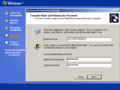
计算机名称和凭据
-

-
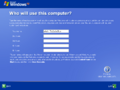


界面


引用资料
注
- ↑ This is only possible by upgrading from the previous build with the tablet pc components installed.