Windows 8 Build 7978.0.fbl_grfx_dev1.110406-1700
| Windows 8 的版本 | |
-Desktop.png) | |
| 操作系统系列 | Windows NT 系列 |
|---|---|
| NT 版本 | Windows NT 6.2 |
| 内部版本号 | 7978 |
| 修订版本号 | 0 |
| 体系结构 | x86 |
| 内部版本实验室 | fbl_grfx_dev1 |
| 编译日期 | 2011 年 4 月 6 日 |
| 有效期 | |
| 时间炸弹 | 2011 年 7 月 1 日 (+86 天) |
| 关于对话框 | |
-About.png) | |
Windows 8 Build 7978.fbl_grfx_dev1 是 Windows 8 的版本,于 2021 年 5 月 9 日共享。
SKU 版本和密钥
| 版本 / SKU 名称 | 密钥 |
|---|---|
| Starter | 7Q28W-FT9PC-CMMYT-WHMY2-89M6G |
| Home Basic | YGFVB-QTFXQ-3H233-PTWTJ-YRYRV |
| Home Premium | RHPQ2-RMFJH-74XYM-BH4JX-XM76F |
| Professional | HYF8J-CVRMY-CM74G-RPHKF-PW487 |
| Ultimate | D4F6K-QK3RD-TMVMJ-BBMRX-3MBMV |
Redpill
Redlock 工具可用于解锁此版本中包括“开始”屏幕在内的所有 Redpill 关卡。
更改了“开始”屏幕的磁贴设计,因此不再采用基于应用图标的彩色背景。取而代之的是引入了深水绿色背景。
Bug
应用磁贴
某些应用名称(例如控制面板(Control Panel)、Chess Titans、优化驱动器(Defragment)和碎片整理(Optimize Drives)等)可能会在普通大小的磁贴上被截断。
升级
此版本无法将所需的安装二进制文件正确复制到临时 Windows 安装启动目录($WINDOWS.~BT),这些文件是继续升级过程下一阶段所必需的。必须使用安装介质的 sources 目录中的旧版安装程序,或使用其他版本的安装组件来执行升级。
高级向量扩展(Advanced Vector Extension)CPU bug
由于一个 bug,在某些使用高级向量扩展(AVX)指令集的 CPU 上,此版本的 x86 编译将无法启动,此 bug 会导致在启动屏幕首次显示后 CPU 立即发生三重故障。条目接下来讨论了一个解决方法。
Aero
在使用 Windows Aero 主题时,只有窗口框架的顶部部分是模糊的,侧边框仍保持透明。
简易版和家庭普通版中的行为
此版本在安装了简易版和家庭普通版后会自动启用 Aero 玻璃透明效果,尽管产品策略限制了此类效果的使用。将当前的视觉样式更改为其他样式(例如:Windows 基本,Windows Basic)会禁用玻璃效果。
一般
如果在 Build 7878 中使用 VMware Workstation 15.x 或更高版本,在此版本中尝试重启或关闭将导致软件锁死。若要解决此问题,请使用 VM 菜单中的电源选项。此错误会持续到 Build 8008。
其他
- 在某些设备上,打开 Windows 照片查看器或 Internet Explorer 会导致
0x50蓝屏错误。通常可以通过使用 Windows 基本(Windows Basic)主题来修复,或者在某些计算机上,通过安装专用显卡驱动程序来解决。
编译器
这是使用新编译器生成的首批版本之一。然而,当时围绕它的问题导致此版本在某些硬件上无法启动,引导加载程序在现代 x86 CPU(特别是包括 AVX 指令集的英特尔处理器和部分 AMD CPU)上无法正常工作。因此,会发生 CPU 三重故障,导致在虚拟机管理程序上崩溃或在真实硬件上重启。
修补 winload.exe 以在支持 AVX 的英特尔处理器上运行
为了在配备支持 AVX 的英特尔处理器的机器上正确启用 SSE 指令,必须开启控制寄存器 4(CR4)中的第 9 位。以下代码被执行,并位于 winload.exe 的 A552 偏移处:
mov     eax, cr4        ; 0f20e0
or      eax, 20h        ; 83c820        -- 开启第 5 位,PAE(Physical Address Extension,物理地址扩展)
mov     cr4, eax        ; 0f22e0        -- 存储到 CR4
mov     eax, cr0        ; 0f20c0
or      eax, 80000000h  ; 0d00000080    -- 启用分页
mov     cr0, eax        ; 0f22c0
默认情况下,CR0 中设置的位包括:受保护模式(PE)(0x00000001)、协处理器监控(MP)(0x00000002)和扩展类型(ET)(0x00000010),而 CR4 中最初没有任何位被设置,因此需要开启第 9 SSE 位(即 OR 和 0x600),但由于这段代码的限制,需要进行重写,可以改为以下方式:
mov     eax,620h        ; b820060000
mov     cr4,eax         ; 0f22e0
mov     eax,80000013h   ; b813000080
mov     cr0,eax         ; 0f22c0
nop                     ; 90
nop                     ; 90
nop                     ; 90
nop                     ; 90
需要声明的是,用这些更改来修改 winload.exe 将会使签名失效,因此需要在 BCD 中启用 {bootmgr} nointegritychecks 才能使用修改后的 winload.exe 启动,同时在 %systemroot%\System32 和 %systemroot%\System32\Boot 中对此文件的所有权也需要进行修改,以防无法替换文件。
兼容性
VMware Workstation
英特尔 SSE 漏洞可以通过将兼容性级别设置为 7.x 或更低版本来解决,且必须将以下代码块添加到 VMX(虚拟机配置)文件中,以允许此版本在现代英特尔 CPU 上启动:
cpuid.0.ebx = "0110:1000:0111:0100:0111:0101:0100:0001"
cpuid.0.ecx = "0100:0100:0100:1101:0100:0001:0110:0011"
cpuid.0.edx = "0110:1001:0111:0100:0110:1110:0110:0101"
cpuid.1.eax = "0000:0000:0000:0001:0000:0110:0111:0001"
如果主机使用的是 AMD 处理器,上述配置步骤大多不需要,仅需更改兼容性版本即可。
图库
-
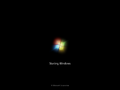
启动屏幕
-
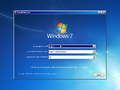
安装程序
-

Metro 欢迎屏幕
-

Metro“开始”屏幕
-
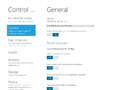
沉浸式控制面板
-
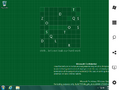
Charms 栏
-
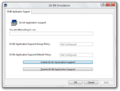
16 位模拟


-StartScreen.png)
-ImmersiveControlPanel.png)
-CharmsBar.png)
