Windows 8 Build 7973.0.fbl_core1_kernel_npc.110330-1809
| Windows 8 的版本 | |
 | |
| 操作系统系列 | Windows NT 系列 |
|---|---|
| NT 版本 | Windows NT 6.2 |
| 内部版本号 | 7973 |
| 修订版本号 | 0 |
| 体系结构 | x86 |
| 内部版本实验室 | fbl_core1_kernel_npc |
| 编译日期 | 2011 年 3 月 30 日 |
| 有效期 | |
| 时间炸弹 | 2011 年 7 月 1 日 (+93 天) |
| 关于对话框 | |
 | |
Windows 8 Build 7973.fbl_core1_kernel_npc 是 Windows 8 的版本,于 2015 年 9 月 19 日上传到 BetaArchive。[1]
新增功能和更改
内核
更新了启动画面,可以在更高分辨率的屏幕上显示,并包含了Windows 7 早期版本(自 6910 到 7231)的壁纸中的鱼,以及启动旋转器,不过尺寸稍大于后期版本。内核中的字体也已更改:内核字体从 Lucida Console 更改为 Segoe Mono Boot,系统崩溃屏幕的字体从 Segoe UI 改为 Segoe WP。
早期的崩溃屏幕现在包括额外的参数,由四种不同的错误代码组成。
启动管理器
启动管理器条目现在被命名为“Windows 8”,而非“Windows 7”,以便将其与前一版本区分开来。
Redpill
- “开始”屏幕开始看起来与之前的版本有很大不同,磁贴的设计更改为更接近最终设计的外观。
- 重新设计了沉浸式控制面板。
- MS Help 的启动画面更改为用 Microsoft 画图制作的相当粗糙的版本。
- 在 Build 7970 中看到的 Metro 文件夹图标和缩略图被禁用,且无法重新启用。
Bug
应用磁贴
某些应用名称(例如控制面板(Control Panel)、Chess Titans、优化驱动器(Defragment)和碎片整理(Optimize Drives)等)可能会在普通大小的磁贴上被截断。
高级向量扩展(Advanced Vector Extension)CPU bug
由于一个 bug,在某些使用高级向量扩展(Advanced Vector Extension,AVX)指令集的 CPU 上,此版本的 x86 编译将无法启动,此 bug 会导致在启动屏幕首次显示后 CPU 立即发生三重故障。条目接下来讨论了一个解决方法。
这个问题也可能表现为连续发生三次错误检查,屏幕上不同的错误代码相互覆盖。
升级
此版本无法将所需的安装二进制文件正确复制到临时 Windows 安装启动目录($WINDOWS.~BT),这些文件是继续升级过程下一阶段必要的。必须使用安装介质的 sources 目录中的旧版本安装程序,或者使用其他版本的安装组件来执行升级。
Aero
在使用 Windows Aero 和 Aero Lite 主题时,只有窗口框架的顶部部分是模糊的,侧边框仍保持透明。
伪语言包
在此版本中,伪语言包存在,并且可以安装。这是由于在准备版本时未正确清理伪语言包,导致残留文件所造成的。
编译器
这是使用新编译器生成的首批版本之一。然而,当时围绕它的问题导致此版本在某些硬件上无法启动,引导加载程序在现代 x86 CPU(特别是包括 AVX 指令集的英特尔处理器和部分 AMD CPU)上无法正常工作。因此,会发生 CPU 三重故障,导致在虚拟机管理程序上崩溃或在真实硬件上重启。
修补 winload.exe 以在支持 AVX 的英特尔处理器上运行
为了在配备支持 AVX 的英特尔处理器的机器上正确启用 SSE 指令,必须开启控制寄存器 4(CR4)中的第 9 位。以下代码被执行,并位于 winload.exe 的 A552 偏移处:
mov     eax, cr4        ; 0f20e0
or      eax, 20h        ; 83c820        -- 开启第 5 位,PAE(Physical Address Extension,物理地址扩展)
mov     cr4, eax        ; 0f22e0        -- 存储到 CR4
mov     eax, cr0        ; 0f20c0
or      eax, 80000000h  ; 0d00000080    -- 启用分页
mov     cr0, eax        ; 0f22c0
默认情况下,CR0 中设置的位包括:受保护模式(PE)(0x00000001)、协处理器监控(MP)(0x00000002)和扩展类型(ET)(0x00000010),而 CR4 中最初没有任何位被设置,因此需要开启第 9 SSE 位(即 OR 和 0x600),但由于这段代码的限制,需要进行重写,可以改为以下方式:
mov     eax,620h        ; b820060000
mov     cr4,eax         ; 0f22e0
mov     eax,80000013h   ; b813000080
mov     cr0,eax         ; 0f22c0
nop                     ; 90
nop                     ; 90
nop                     ; 90
nop                     ; 90
需要声明的是,用这些更改来修改 winload.exe 将会使签名失效,因此需要在 BCD 中启用 {bootmgr} nointegritychecks 才能使用修改后的 winload.exe 启动,同时在 %systemroot%\System32 和 %systemroot%\System32\Boot 中对此文件的所有权也需要进行修改,以防无法替换文件。
兼容性
VMware Workstation
英特尔 SSE 漏洞可以通过将兼容性级别设置为 7.x 或更低版本来解决,且必须将以下代码块添加到 VMX(虚拟机配置)文件中,以允许此版本在现代英特尔 CPU 上启动:
cpuid.0.ebx = "0110:1000:0111:0100:0111:0101:0100:0001"
cpuid.0.ecx = "0100:0100:0100:1101:0100:0001:0110:0011"
cpuid.0.edx = "0110:1001:0111:0100:0110:1110:0110:0101"
cpuid.1.eax = "0000:0000:0000:0001:0000:0110:0111:0001"
如果主机使用的是 AMD 处理器,上述配置步骤大多不需要,仅需更改兼容性版本即可。
图库
安装
-
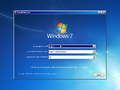
安装程序
-
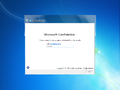
-
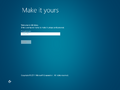
Metro OOBE


界面


Redpill 限定
-

锁屏界面
-

Metro 登录界面
-

“开始”屏幕
-
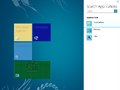
Search Charm
-

Other Programs
-

Settings charm
-

Charm 栏
-

Windows Explorer (Redpilled)
-
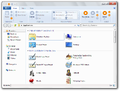
Applications folder
-

Modern Task Manager
-

Ditto
-

Advanced Task Manager
-

沉浸式控制面板
-
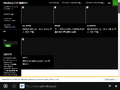
Immersive Internet Explorer
-

MS Help splash screen
-

MS Help


-Start.png)


其他
-

启动屏幕
-

Early boot error
-
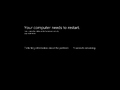
System crash


