Windows 10 Build 9785.0.fbl_partner_eeap.140629-0030
| Windows 10 的版本 | |
 | |
| 操作系统系列 | Windows NT 系列 |
|---|---|
| NT 版本 | Windows NT 6.3 |
| 内部版本号 | 9785 |
| 修订版本号 | 0 |
| 体系结构 | x86, x64 |
| 内部版本实验室 | winmain |
| 编译日期 | 2014 年 6 月 29 日 |
| 有效期 | |
| 时间炸弹 | 2015 年 7 月 15 日 (+381 天) |
| 关于对话框 | |
 | |
  | |
Windows 10 build 9785 is the earliest available build of Windows 10, which was uploaded to BetaArchive on 19 February 2019.
This build was originally released to Microsoft partners participating in the Ecosystem Engineering Access Program (EEAP), as indicated by the fbl_partner_eeap branch.
Due to its earliness, this build identifies itself as Windows 8.1 in many areas and still bears the 6.3 kernel version.
SKU 版本和密钥
| Key | 密钥 |
|---|---|
| Core | 334NH-RXG76-64THK-C7CKG-D3VPT |
| Professional | XHQ8N-C3MCJ-RQXB6-WCHYG-C9WKB |
| ProfessionalWMC (edition upgrade only) | GBFNG-2X3TC-8R27F-RMKYB-JK7QT |
New features and changes
User interface
An early version of the Notification Center has been included, in the form of a tray icon on the taskbar. It can enabled via the Turn system icons on or off Control Panel applet; however, it currently lacks functionality.
The files responsible for creating an MS-DOS boot disk, diskcopy.com and diskcopy.dll have been removed. However, it is currently impossible to verify whether the option is gone from the Format dialog, as it doesn't work, and the MS-DOS boot disk option is removed at runtime, instead of in the dialog itself.
Applications
File Explorer now uses decimal values to calculate the file and folder sizes. For example, a drive that shows up as 931 GB in other versions of Windows will show up as a full 1 TB in this build.
A new Devices Flow application has been added, which shows options for projecting the screen to a secondary display. It is possible to tie it to the ⊞ Win+P keys by setting the following registry key:
[HKEY_LOCAL_MACHINE\SOFTWARE\Microsoft\Windows\CurrentVersion\ImmersiveShell\DevicesFlow]
"IsActive"=dword:00000001
Deprecations and removals
Support for floppy disk controllers and drives has been temporarily removed from the operating system. It was readded later in build 9900.
Bugs and quirks
Shell
If the user's taskbar is present on the right of the screen and no apps are pinned, opening the start menu will cause it to float in the middle of the screen. Additionally, the items on the All Apps list will have their text colored black if there isn't enough apps displayed to show a scrollbar.
Additionally, when auto-colorization is enabled, the taskbar preview borders do not automatically update their color when the wallpaper changes. This issue can be resolved by manually adjusting the window color through the Control Panel or by restarting Windows.
The length of taskbar items with the Never Combine option is shorter than usual.
The icon positions on the desktop and File Explorer view settings are not preserved between Explorer sessions.
Application Frame Host
The title bars are still designed to match the styling of Win32 applications. Additionally, the title bar does not display an application name, except in the case of the Open dialog. However, it will appear as a window inside of the app that opened it.
Despite the titlebar not containing the app name, by quickly opening Alt-Tab when an app is first launched, a window that contains the app's name can be found, as well as an unsupported size warning.
Certain Metro applications have not been optimized for flexible window sizes, which may result in improper display based on the user's chosen window size. Also, the initial segment of the animation for launching a Metro app in full-screen mode will still play, but it will abruptly halt when the Metro application window is displayed on the desktop, and the application windows will remain visible for a short period after the user closes them, and when they do finally close, they vanish suddenly without any transition effects. The taskbar may also sometimes play the hide animation, then reappear once it finishes.
After first opening and closing a Metro application, ghost windows will display in the Alt+↹ Tab window switcher, with them having the ApplicationFrameWindow and MetroGhostWindow classes. These can be selected using the Window snip mode of the Snipping Tool program.
Applications
File Explorer might crash when opening the browser's jump lists in the taskbar and start menu. Furthermore, the Format dialog is inaccessible, disabling the ability to format drives via Windows Explorer.
The System Properties applet and the PC info section in PC settings will report the incorrect amount of RAM as a result of using decimal values for size calculation. Other areas, such as the Task Manager will show the correct RAM amount. Additionally, selecting wallpapers through the Personalization Control Panel applet might cause performance issues.
The Devices Flow application uses incorrect icons for each projecting options, such as the PC screen only option has its representative image being swapped with the one of the Duplicate option, and the Extend option image being swapped with the Second screen only option. In addition to that, the timeout dialog in the Devices Flow application has no text.
Safe Mode
Trying to boot into Safe mode (whether via Startup Settings or MSConfig) results in a black screen.
Gallery
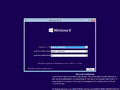
Setup
-
-
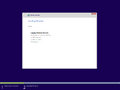
Installation progress
-

Completing
-
-
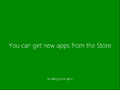
Preparing stage


Interface
-
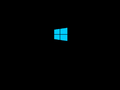
启动屏幕
-
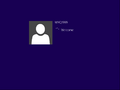
登录界面
-
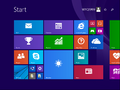
-
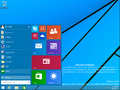
Start menu
-
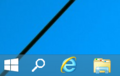
Taskbar with search button enabled
-
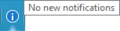
Notification Center and its tooltip
-
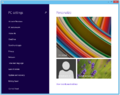
Windowed Metro application example
-
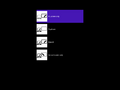
Devices Flow
-
Ditto, timeout counter


