Windows Server 2012 Build 7801.0.fbl_dnt1.100817-2000
| Windows Server 2012 的版本 | |
 Default desktop | |
 Desktop with Aero theme enabled | |
| 操作系统系列 | Windows NT 系列 |
|---|---|
| NT 版本 | Windows NT 6.1 |
| 内部版本号 | 7801 |
| 修订版本号 | 0 |
| 体系结构 | x64 |
| 内部版本实验室 | fbl_dnt1 |
| 编译日期 | 2010 年 8 月 17 日 |
| 有效期 | |
| 时间炸弹 | 2011 年 2 月 5 日 (+172 天) |
| 关于对话框 | |
 | |
Windows Server 2012 build 7801 is a build of Windows Server 2012, which was shared on 12 October 2024 along with the fbl_grfx_dev1 compile of its client counterpart and build 7821.
SKU 版本和密钥
| 版本 / SKU 名称 | 密钥 |
|---|---|
| Standard + StandardCore | HMG6P-C7VGP-47GJ9-TWBD4-2YYCD |
| Enterprise + EnterpriseCore | 7P8GH-FV2FF-8FDCR-YK49D-D7P97 |
| Datacenter + DatacenterCore | 7X29B-RDCR7-J6R29-K27FF-H9CR9 |
| ServerWeb + ServerWebCore | YGTGP-9XH8D-8BVGY-BVK4V-3CPRF |
New features and changes
Redesigned Server Manager
An early iteration of the new Server Manager interface is present in this build, and can be accessed by running C:\Windows\system32\ServerManager.exe.
By default it won't work, as it will not be able to connect to the server. This can be fixed by running winrm quickconfig in a command prompt.
Bugs and quirks
USB 3.0/xHCI
This build includes a non-functional xHCI driver and will not boot if USB 3.0 or later is enabled. Disabling USB 3.0 from the VM configuration (or through the physical machine's BIOS/UEFI firmware) will allow the build to boot normally.
Local Security Policy
Opening the Local Security Policy snap-in causes a warning to appear. It can be safely ignored.
Gallery
-

启动屏幕
-
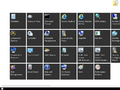
Start screen
-
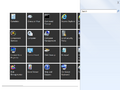
Search charm
-
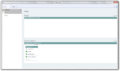
Redesigned Server Manager


