Windows 8 Build 8437.1.fbl_dev_dp8.120621-2300
Windows 8 build 8437.1 (fbl_dev_dp8) is the official Developer Preview 8 build of Windows 8, which was released to Microsoft partners through the Ecosystem Engineering Access Program (EEAP)[1] in late June 2012. Several images of this build running on a Qualcomm Snapdragon S4 (APQ8060A) Mobile Test Platform were first shared online on 9 August 2023; the full build's ARM32 version was later shared in the form of a WIM image dump by Chinese website BetaWorld on 21 August 2023.[2], while the original ISO image of this build's AMD64 compile was shared on 27 October 2024.
| Windows 8 的版本 | |
 | |
| 操作系统系列 | Windows NT 系列 |
|---|---|
| NT 版本 | Windows NT 6.2 |
| 内部版本号 | 8437 |
| 修订版本号 | 1 |
| 体系结构 | ARM32, x64 |
| 内部版本实验室 | fbl_dev_dp8 |
| 编译日期 | 2012 年 6 月 21 日 |
| 有效期 | |
| 时间炸弹 | 2013 年 1 月 15 日 (+208 天) |
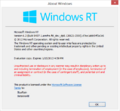
| 关于对话框 | |
 | |
This build uses production code signing and can be booted on Windows on ARM devices without requiring Secure Boot to be turned off.
ARMv7版本安装
QEMU 安装指南:
文件准备
以下是我们需要准备的文件:
- 专门为Windows RT进行修改的QEMU v10.1.0
- 专门为Windows RT进行修改的edk2固件
- 一个虚拟磁盘镜像(用于存储操作系统以便进行模拟)
- 一个Windows RT镜像用于安装系统(要求版本必须高于或者等于6.2.8318.0.fbl_core1_soc.120409-2355)
- 高版本Windows的ESP分区文件(除BCD外)(以15063的文件的文件为例)
注意事项

- 由于在Windows RT Build 8439到Build 9354之间对hal.dll的修改导致改阶段之间的系统完全无法使用原有
hal.dll进行启动,需要替换为Windows RT Build 8437中的版本。
- QEMU的usb输入仿真在某些情况下可能会出现失效的情况.。解决这个情况需要切换到QEMU compatibility monitor (Ctrl+Alt+2) 并输入运行以下指令:
device_del kbd
device_add usb-kbd,id=kbd
- 注意:以下是从工程机泄露的系统需要手动对所有OEM驱动进行删除,否则将会因为驱动不兼容导致系统启动失败:
6.2.8318.0.fbl_core1_soc.120409-2355
6.2.8375.0.winmain_win8rc.120504-1900
6.2.8419.0.winmain.120521-1835
6.2.8437.0.winmain.120618-1325
6.2.8437.1.fbl_dev_dp8.120621-2300
6.2.8520.0.fbl_eeap.120722-1632 - zh-cn以及en-us版本
6.3.9354.0.winmain.130301-1710
6.3.9468.0.winblue_rtm.130725-1203
6.3.9471.0.fbl_partner_out30.130726-2004
6.3.9477.0.fbl_partner_out31.130803-0736
6.3.9477.0.fbl_partner_out21.130803-1037
6.3.9478.0.winblue_rtm.130804-1505
6.3.9600.16596.winblues14_gdr_lean.140112-2038
- 由于未知原因无法通过原有系统的
bootarm.efi进行引导,我们需要换为高版本Windows的文件以进行引导
系统部署
- 使用
diskpart对vhd进行创建并命名为ARM8。接下来将会对EFIESP分区以及主系统分区分别分配盘符为F与P。
说明:maximum=后可以自定义磁盘大小(对于usb设备),如果采用sd设备启动则必须分配磁盘大小为16GB的整数倍
create vdisk file="C:\ARM8\HDD.vhd" maximum=65536 type=expandable
select vdisk file="C:\ARM8\HDD.vhd"
attach vdisk
convert gpt
create partition efi size=100
format quick fs=fat32
assign letter=F
create partition primary
format quick fs=ntfs
assign letter=P
exit
- 手动安装系统并为系统修复引导到
F::
DISM /Apply-Image /ImageFile:"X:\path\to\install.wim" /ApplyDir:P:\ /Index:1
bcdboot "P:\Windows" /s F: /f UEFI
- 修复引导完毕后将压缩包内的文件全部替换到
F:\下
- 弹出虚拟磁盘并创建bat脚本到qemu安装目录内,将以下内容复制到bat内,并对
YYYY-MM-DD进行修改以避免Windows的时间炸弹被触发。
假定我们的qemu主程序位于D:\QEMU v10.0.50-b8218f7 (clang64 dynamic build)\qemu-system-arm.exe,edk2存放于D:\EFISHELL\QEMU_EFI_ArmVirtQemu_ARM_RELEASE.fd
,虚拟磁盘位于C:\ARM8\HDD.vhd
1.SD卡启动配置:
@echo off
cd /d %~dp0
"D:\QEMU v10.0.50-b8218f7 (clang64 dynamic build)\qemu-system-arm.exe" ^
-M virt,force_el3=true,force_psci=on,pci=false,highmem=false ^
-cpu cortex-a15 ^
-smp cores=2,threads=4 ^
--accel tcg,thread=multi ^
-m 2048 ^
-bios "D:\EFISHELL\QEMU_EFI_ArmVirtQemu_ARM_RELEASE.fd" ^
-device VGA ^
-device usb-kbd,id=kbd ^
-device usb-tablet,id=mice ^
-drive id=sys,if=none,file="C:\ARM8\HDD.vhd" ^
-device sd-card,drive=sys ^
-device qemu-xhci ^
-rtc base=YYYY-MM-DD,clock=vm ^
-serial tcp::9090,server,nowait
2.USB启动配置:
@echo off
cd /d %~dp0
"D:\QEMU v10.0.50-b8218f7 (clang64 dynamic build)\qemu-system-arm" ^
-M virt,force_el3=true,force_psci=on,pci=false,highmem=false ^
-cpu cortex-a15 ^
-smp cores=2,threads=4 ^
--accel tcg,thread=multi ^
-m 2048 ^
-bios "D:\EFISHELL\QEMU_EFI_ArmVirtQemu_ARM_RELEASE.fd" ^
-device VGA ^
-device usb-kbd,id=kbd ^
-device usb-tablet,id=mice ^
-drive id=USB0,if=none,file="C:\ARM8\HDD.vhd" ^
-device usb-storage,drive=USB0 ^
-device qemu-xhci ^
-rtc base=YYYY-MM-DD,clock=vm ^
-serial tcp::9090,server,nowait
接下来可运行bat以继续安装Windows
sysprep以及OOBE跳过(可选)
出于某些系统会出现无法继续第二阶段安装,我们可以直接通过修改注册表进行部署: 挂载配置单元SYSTEM与SAM到本地计算机
假设分别挂载为 计算机\HKEY_LOCAL_MACHINE\RT-SYS 计算机\HKEY_LOCAL_MACHINE\RT-SAM
分别创建注册表项以进行下一步操作:
Windows Registry Editor Version 5.00

[HKEY_LOCAL_MACHINE\RT-SYS\Setup]
"SystemSetupInProgress"=dword:00000000
"SetupPhase"=dword:00000000
"CmdLine"=""
"SetupType"=dword:00000000
"OOBEInProgress"=dword:00000000
Windows Registry Editor Version 5.00

[HKEY_LOCAL_MACHINE\RT-SAM\SAM\Domains\Account\Users\000001F4]
"F"=hex:02,00,01,00,00,00,00,00,38,7f,6a,e2,35,6a,cd,01,00,00,00,00,00,00,00,\
00,58,3c,23,69,37,6a,cd,01,00,00,00,00,00,00,00,00,00,00,00,00,00,00,00,00,\
f4,01,00,00,01,02,00,00,10,02,00,00,00,00,00,00,00,00,01,00,01,00,00,00,00,\
  00,00,00,00,00,00,00
分别导入后卸载配置单元,随后再卸载vhd,并启动bat
由于QEMU模拟的性能问题系统运行效率较低,需要耐心进行等待
此教程适用于Windows RT Build 8318以及以上的版本
SKU 版本和密钥
| SKU 版本 | 密钥 |
|---|---|
| RT (CoreARM) | BN4FD-28M77-4VJMY-C9R68-XWW48 |
| Core | 2H7NK-3VJJY-HHY3Y-WM3T8-JFCRY |
| Professional | GCNRF-BHBCM-W9YWM-VWQP6-TJBWR |
| ProfessionalWMC (edition upgrade only) | JGN88-JG6P9-XWD9R-3VX46-9KTF7 |
Changes
Desktop Gadget Gallery removal
The Desktop Gadget Gallery was removed from the operating system due to remote-code execution vulnerabilities which were disclosed in a security advisory weeks later on 10 July 2012,[3] which was additionally complimented with a package that respectively disabled the Windows Sidebar and Desktop Gadget Gallery functionalities on Windows Vista and Windows 7.[3]
Miscellaneous
- The Windows Store application received its final icon design.
- The previous Windows logo on the ⊞ Win key in the On-Screen Keyboard has been replaced by the new one.
Bugs and quirks
- Elements in the Windows Easy Transfer migration application do not size correctly.
Built-in development tools
This build's ARM32 image dump includes a set of development tools primarily targeted towards Qualcomm hardware and driver development. In particular, the Windows\Setup\scripts directory includes the following customizations and additions for the operating system:
- Scripts for provisioning the associated development kit that the build originated from
- Internal Qualcomm documentation for Secure Boot enablement, along with an early Secure Boot Debug Policy dated 16 May 2012 and a debug policy installer application from build
6.2.8432.0 (winmain.120611-1243) - The Windows App Certification Kit from its earlier winmain compile
- Remote Tools for Visual Studio 2012, build 11.0.50623.2
- Windows Device Console from build
6.2.8522.0 (win8_rtm.120721-1642) - Original WinJS AppX dependency packages from build 8377, and the AT&T Communications Manager (presumably required for mobile operator testing)
- Windows PowerShell commandlets for
Add-AppDevPackage
- Windows PowerShell commandlets for
- Firmware for the Sierra Wireless AirPrime MC7700 modem, version 03.05.12.04
- NVIDIA Tegra 3 Cardhu development kit-related specifics which were unintentionally included as part of the image; relies on the presence of a
nvidia.txttext document in the script folder root to install- Icera modem firmware (revision 3.00_9.2) and factory testing utilities
- Board power configuration
- The respective Camera and Reader applications from builds 8514 and 8513 (win8_rtm)
Gallery
x64 compile
Interface


ARM32 compile
Interface
-
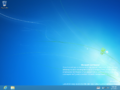
Desktop
-
-

-
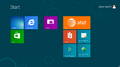
Ditto, with development tools
-
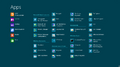
Application list with development tools
-

AT&T Communication Manager
-
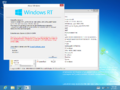
Desktop with
winverand Registry Editor


Built-in development tools
-
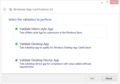
Windows App Certification Kit
-
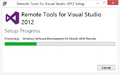
Remote Tools installer
-
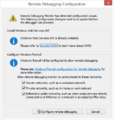
Remote Debugger first run
-
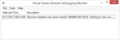
Visual Studio Remote Debugger
-
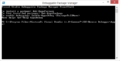
Debuggable Package Manager
-
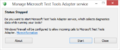
Microsoft Test Tools Adapter Configuration Tool


Images published prior to upload
Test Platform photographs
-
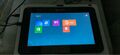
Start Screen
-
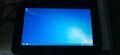
Desktop
-
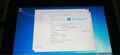
System Properties Control Panel subpage
-
Watermark


Interface
-
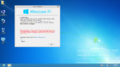
Desktop with
winver -
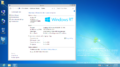
System Properties


Miscellaneous
-
-
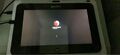
Boot screen on the Mobile Test Platform


引用资料
- ↑ Syel, Kevin. Problems with Win8 8520?, AutoIt Forums. 27 July 2012.
- ↑ https://blog.betaworld.cn/archives/122
- ↑ 3.0 3.1 Microsoft. Vulnerabilities in Gadgets Could Allow Remote Code Execution (Microsoft Security Advisory 2719662), Microsoft Security Response Center. 10 July 2012.